Page 1 of 2
Windows retro ricing
Posted: Mon Feb 16, 2026 2:34 am
by John Titor
Anyone know how to rice out windows 10 to make it look more retro? Or firefox aswell, on linux its a bit easier but im not sure what type of things i could do that wouldnt affect performance too much
Re: Windows retro ricing
Posted: Mon Feb 16, 2026 2:56 am
by Maypews
John Titor wrote: Mon Feb 16, 2026 2:34 am
Anyone know how to rice out windows 10 to make it look more retro? Or firefox aswell, on linux its a bit easier but im not sure what type of things i could do that wouldnt affect performance too much
Retrobar and
Open Shell. Former restores a vintage task bar, latter restores a vintage start menu, pretty much no risk of anything going wrong with these two. It's possible to get more hands on and change things like titlebars and whatnot but you can screw your OS up if you don't know what your doing, if you want to try anyway though there's stuff like Windowblinds (costs money but there's a free trial exploit you can use) and the Windows Transformation Pack, the latter of which I installed on my secondary laptop.
Regarding Firefox, it used to have a theme called
Echelon and it's technically still around but the browser version it's for (115 ESR) is now severely outdated and many sites are breaking if you try to use it with it. I would know as I basically rode it out until it started becoming unusable sadly. I'm on Pale Moon now but it's literally just a fork of an ancient Firefox version and struggles with a lot of sites as a result so I constantly have to switch between browsers. The state of non-terrible UI for web browsers is grim currently.
Re: Windows retro ricing
Posted: Mon Feb 16, 2026 3:07 am
by John Titor
Maypews wrote: Mon Feb 16, 2026 2:56 am
John Titor wrote: Mon Feb 16, 2026 2:34 am
Anyone know how to rice out windows 10 to make it look more retro? Or firefox aswell, on linux its a bit easier but im not sure what type of things i could do that wouldnt affect performance too much
Retrobar and
Open Shell. Former restores a vintage task bar, latter restores a vintage start menu, pretty much no risk of anything going wrong with these two. It's possible to get more hands on and change things like titlebars and whatnot but you can screw your OS up if you don't know what your doing, if you want to try anyway though there's stuff like Windowblinds (costs money but there's a free trial exploit you can use) and the Windows Transformation Pack, the latter of which I installed on my secondary laptop.
Regarding Firefox, it used to have a theme called
Echelon and it's technically still around but the browser version it's for (115 ESR) is now severely outdated and many sites are breaking if you try to use it with it. I would know as I basically rode it out until it started becoming unusable sadly. I'm on Pale Moon now but it's literally just a fork of an ancient Firefox version and struggles with a lot of sites as a result so I constantly have to switch between browsers. The state of non-terrible UI for web browsers is grim currently.
Thank you so much! ill set these up tomorrow this really helps
Re: Windows retro ricing
Posted: Tue Feb 17, 2026 4:35 pm
by capstasher
This is how I have it set up

Re: Windows retro ricing
Posted: Tue Feb 17, 2026 4:41 pm
by capstasher
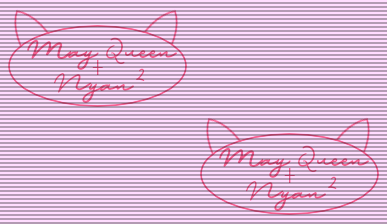
Oh yeah, the wallpaper is custom made to resemble that on the FGL PC. It's not 1 to 1 as I used the closest matching fonts on DaFont, but here you go.
Re: Windows retro ricing
Posted: Tue Feb 17, 2026 4:56 pm
by Maypews
capstasher wrote: Tue Feb 17, 2026 4:41 pm
Oh yeah, the wallpaper is custom made to resemble that on the FGL PC. It's not 1 to 1 as I used the closest matching fonts on DaFont, but here you go.
This wallpaper is very cool, thank you for sharing!

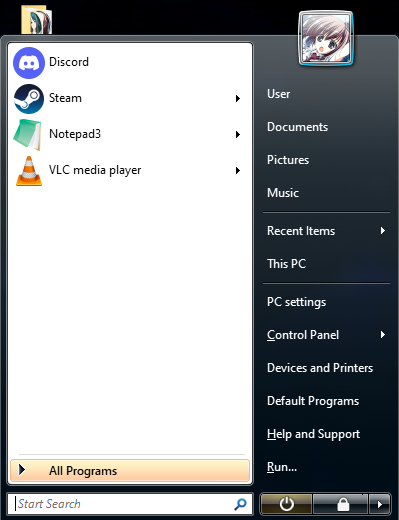
Your start menu looks pretty similar to mine, though I believe you've got a Windows 7 one while I'm on Vista so there are some differences. I just love the aesthetics of Vista, such a beautiful OS.
Re: Windows retro ricing
Posted: Tue Feb 17, 2026 5:24 pm
by Blond
This is how I have it set up
How did you manage to make Windows 11 to look like Windows 7? Also, great Konata pfp.
Re: Windows retro ricing
Posted: Tue Feb 17, 2026 7:58 pm
by capstasher
Blond wrote: Tue Feb 17, 2026 5:24 pm
How did you manage to make Windows 11 to look like Windows 7? Also, great Konata pfp.
As May said, Retrobar and Open Shell! They do the trick quite well.
Re: Windows retro ricing
Posted: Tue Feb 17, 2026 8:04 pm
by Blond
As May said, Retrobar and Open Shell! They do the trick quite well.
Thanks bro!
Re: Windows retro ricing
Posted: Fri Feb 20, 2026 9:24 pm
by cidoku
He, he. You guys still use an OS made after 2007 that you need to rice?